.svg)




Someone in your business has decided it's time to run paid search ads. That someone might be your MD, your board, or a new commercial target that's landed in your lap. Either way, the question has come to you: "How much should we spend?"
It's a deceptively hard question. And the honest answer is: you can't know with certainty until you've run campaigns and gathered real data. But that doesn't mean you should guess, pick a round number, or take the first figure Google suggests at face value.
What you can do is build a defensible estimate, one grounded in your commercial targets, realistic conversion assumptions, and an understanding of how B2B ad auctions actually work.
This post walks you through exactly that. We'll cover two approaches: working forward from estimated cost-per-click, and working backwards from what you're actually willing to pay for a qualified lead. We'll also cover why "let's start cheap and see" is one of the most common, and costly, mistakes in B2B PPC.
Why "Let's Start Small" Usually Backfires
The instinct to start with a modest budget is understandable. You're testing something new, you want to limit risk, and nobody wants to waste money. The problem is that in B2B PPC, an underfunded campaign doesn't just underperform, it can actively mislead you.
Google's ad auction rewards relevance and budget confidence. If your daily budget runs out by midday, your ads stop showing. If your bids are too low to compete, your ads show in poor positions with low click-through rates, which tanks your Quality Score, which raises your CPCs over time. You end up spending money to collect bad data.
The minimum viable budget in B2B PPC isn't about being cautious. It's about spending enough to generate statistically meaningful results within a reasonable timeframe.
A campaign that generates three leads a month can't tell you anything useful about what's working. You need volume to optimise. That usually means committing to a budget that feels slightly uncomfortable, because comfortable budgets rarely generate enough signal.
This doesn't mean you need to spend recklessly. It means your starting budget should be calculated, not arbitrary.
Take Google's Average CPCs With a Pinch of Salt
When people research B2B PPC budgets, they often land on published CPC benchmarks by industry. These numbers aren't wrong, exactly, but they're averages across all advertisers, all targeting configurations, and all levels of campaign sophistication. They're a starting point, not a budget.
Here's what those averages don't account for:
- Audience targeting layers. When you layer in in-market audiences, job title targeting, or remarketing lists for search ads (RLSAs), you're competing against every other advertiser who's done the same. These audiences are highly contested. CPCs on a targeted audience list can be 30-60% higher than the base keyword CPC.
- Device targeting. B2B buyers on desktop typically convert at a higher rate than mobile. Experienced advertisers bid up on desktop. If you're competing for the same decision-makers, you're competing in that elevated auction.
- Geo targeting. Targeting London and the South East? You're in the most competitive, highest-CPC geography in the UK. Broad national averages will understate your actual costs significantly.
- Dayparting. Running ads during business hours (when B2B buyers are active) means your ads compete during peak demand windows, exactly when everyone else is also bidding.
The practical implication: if you're running a well-targeted B2B campaign, expect your actual CPCs to sit meaningfully above the published averages. Budget for that reality, not the benchmark.
A useful exercise is to run a Google Keyword Planner forecast for your core keywords with your specific geo and device settings applied. That gives you a far more accurate CPC estimate than any industry report.
Two Ways to Calculate Your Starting Budget
There are two approaches we use with new clients. Ideally, you run both and see where they converge.
Method 1: Work Forward From CPC
This is the volume-based approach. You're asking: "How many clicks do I need to generate enough leads, and what will those clicks cost?"
The formula:
Monthly budget = Estimated CPC × (Target leads ÷ Landing page conversion rate)
A worked example:
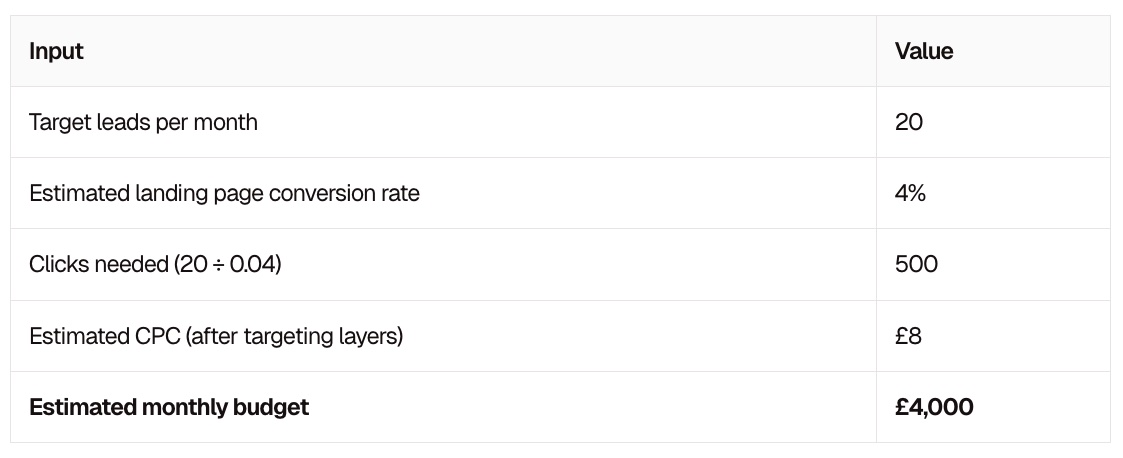
The two variables that move this number most are your conversion rate and your CPC estimate. Be conservative on both. A 4% conversion rate is reasonable for a well-optimised B2B landing page; many start lower. And as covered above, your real CPC after targeting will likely exceed the baseline benchmark.
Method 2: Work Backwards From Cost-Per-Qualified-Lead
This is the approach we'd argue is more strategically sound for B2B, because it forces a commercial conversation before a single pound is spent.
The question to answer first: what is a qualified lead actually worth to your business?
If your average deal value is £15,000 and your sales team closes 20% of qualified leads, each qualified lead is worth £3,000 in expected revenue. If your gross margin is 50%, the revenue value of a lead is £1,500. Most businesses would happily pay £150-300 per qualified lead for that return, a 5-10x return on ad spend.
Once you know your target cost-per-qualified-lead (CPQL), work backwards:
Monthly budget = Target CPQL × Target qualified leads per month
So if you want 15 qualified leads at a maximum CPQL of £200:
£200 × 15 = £3,000/month
The advantage of this method is that it anchors your budget to business outcomes, not media metrics. It also gives you a clear signal for when to scale: if your actual CPQL comes in below £200, you have headroom to increase spend.
Our free PPC budget calculator runs both methods simultaneously, letting you model different conversion rate and CPC scenarios side-by-side. Worth bookmarking before you finalise any numbers.
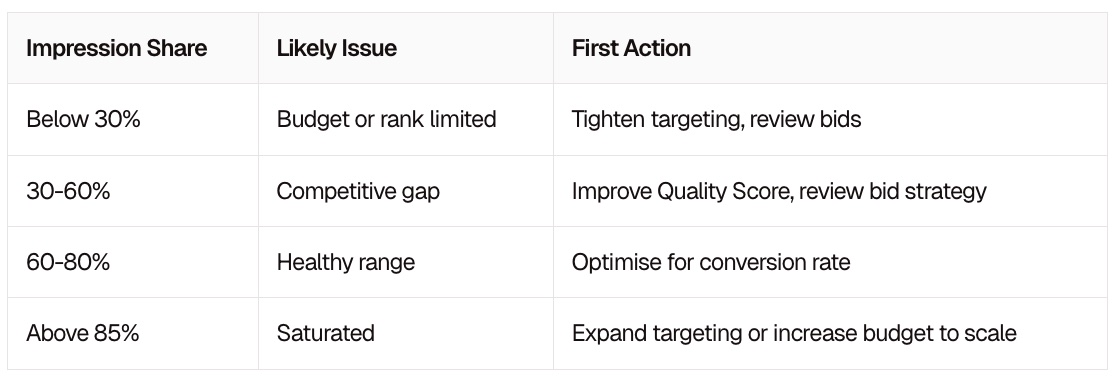
Once You're Live: Use Impression Share to Calibrate Your Budget
Pre-launch calculations are estimates. The real calibration happens once your campaigns are running and you can look at Search Impression Share (IS), the percentage of eligible auctions where your ads actually appeared.
Google Ads shows this at campaign, ad group, and keyword level. It's one of the most underused metrics in B2B PPC, and it's the clearest signal of whether your budget is working for or against you.
If Your Impression Share Is Low (Below 40-50%)
Your ads aren't showing for a significant portion of relevant searches. This can mean one of two things:
- Budget-limited: Your daily budget runs out before the day ends, so Google stops showing your ads. You're missing auctions you could win.
- Rank-limited: Your bids or Quality Score aren't competitive enough to enter the auction consistently.
The fix isn't always to increase budget. If you're budget-limited, consider tightening your targeting before adding spend:
- Reduce geo targeting to your highest-converting regions only
- Apply negative keywords to cut irrelevant traffic
- Layer in audience targeting to focus spend on the most qualified users
- Restrict to business hours if your B2B audience isn't active evenings and weekends
Tightening targeting reduces the eligible auction pool, so your existing budget covers a higher share of the auctions that actually matter.
If Your Impression Share Is High (Above 80-85%)
You've saturated your current targeting configuration. Your budget is doing its job, but there's a ceiling on what this campaign can deliver without expanding.
At this point, consider loosening your parameters to grow volume:
- Broaden geo targeting to adjacent regions
- Test broader match types (carefully, with strong negative keyword lists)
- Expand your keyword set to capture adjacent intent
- Add new audience segments to reach prospects earlier in the buying cycle
The key insight: impression share tells you whether your budget problem is a spending problem or a targeting problem. Most of the time, it's the latter, and the answer is to optimise the targeting before reaching for more budget.
The Number to Agree Before You Start
Before you finalise any budget figure, get alignment on one number internally: your maximum acceptable cost-per-qualified-lead.
Not cost-per-click. Not cost-per-form-fill. Cost per lead that your sales team would actually want to work.
This number does several things at once. It sets a ceiling on your CPCs (if you're paying £15 per click and converting at 3%, your cost-per-lead is £500, is that acceptable?). It gives you a framework for deciding when to scale and when to pause. And it forces a commercial conversation with your MD or sales director before the campaign launches, which prevents the "we're spending how much?!" conversation six weeks in.
A quick sense-check framework:
- What is your average deal value?
- What percentage of qualified leads does your sales team close?
- What gross margin does that deal generate?
- What CPQL gives you a 5x return on ad spend or better?
If the maths works at your realistic CPQL, you have a budget worth committing to. If it doesn't, the problem isn't PPC, it's the unit economics, and no amount of clever targeting will fix that.
We've built a free spreadsheet that runs these calculations for you, including low and high conversion rate scenarios so you can stress-test your assumptions. Download the free PPC budget calculator here it takes about ten minutes to fill in and will give you a number you can actually defend in a
Quick Reference: B2B PPC Budget Checklist
Before you commit a number to your stakeholders, run through this:
- Estimated CPC sourced from Keyword Planner with your specific geo and device settings applied (not a generic industry average)
- Audience and targeting layers factored into CPC estimate (add 30-50% buffer if layering in-market audiences or RLSAs)
- Maximum acceptable CPQL agreed with sales and finance
- Both budget methods run (forward from CPC, backwards from CPQL), do they converge?
- Budget sufficient to generate at least 50-100 clicks per week for meaningful data
- Plan in place to review Search Impression Share after the first 2-3 weeks
- Targeting tightening strategy identified (geo, device, audience, dayparting) in case IS is low
- Expansion plan identified (broader geo, match types, new audiences) in case IS is high
No budget calculation survives first contact with a live campaign unchanged. But going in with a calculated estimate, rather than a gut feel, means you'll know what the data is telling you when it starts coming